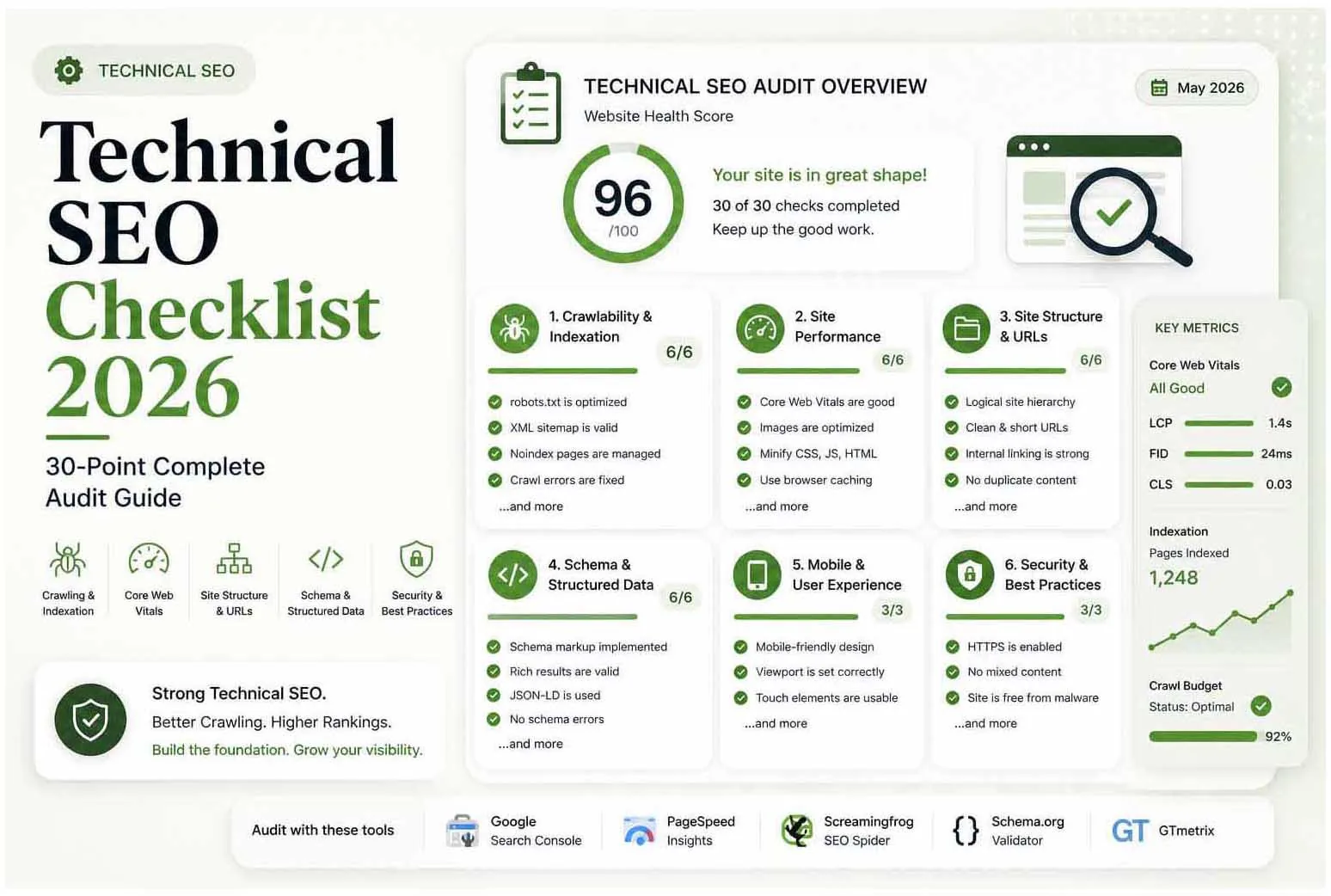
Technical SEO is the foundation everything is built on. Without it, great content and strong backlinks can't fully do their job. This checklist covers every element that impacts how Google crawls, indexes, and ranks your site.
This is the SEO Pillar Guide. For deeper dives into supporting topics read: Core Web Vitals 2026 · On-Page SEO Guide · Rank in AI Overviews · SEO vs AEO vs GEO · Keyword Research Guide
How to use this: Work through each section in order. Fix critical issues first, then improvements. Re-audit every 3 months.
1. Crawlability & Indexation
- robots.txt is present, correctly configured, not blocking important pages
- XML sitemap is present, submitted to GSC, and kept up to date
- No important pages are accidentally noindexed
- Canonical tags are correctly implemented with no self-referencing issues
- Crawl errors in GSC are reviewed and resolved
- Crawl budget is not wasted on low-value pages (pagination, filters)
- Hreflang is correctly implemented if the site is multilingual
2. Site Performance & Core Web Vitals
- LCP (Largest Contentful Paint) is under 2.5 seconds
- INP (Interaction to Next Paint) is under 200ms
- CLS (Cumulative Layout Shift) score is under 0.1
- Images are sized, compressed, and served in WebP/AVIF format
- Render-blocking JavaScript and CSS are minimised or deferred
- A Content Delivery Network (CDN) is in use
- Server response time (TTFB) is under 800ms
3. Site Structure & URLs
- URL structure is clean, descriptive, and keyword-relevant
- No duplicate content — canonical tags or 301 redirects in place
- All redirect chains are cleaned up (A→B→C becomes A→C)
- Internal linking is strategic — important pages receive the most links
- 404 errors are monitored and redirected where appropriate
- Breadcrumb navigation is implemented site-wide
4. Schema & Structured Data
- Organization schema on the homepage
- Article/BlogPosting schema on all blog posts
- BreadcrumbList schema on all pages
- FAQPage schema on FAQ-style content
- LocalBusiness schema with correct NAP data (if applicable)
- No schema errors in Google's Rich Results Test
5. Mobile Optimization
- Site passes Google's Mobile-Friendly Test
- Viewport meta tag is correctly set
- Tap targets are at least 48x48px
- Body font size is at least 16px — no zooming required
- No horizontal scrolling on any mobile device
6. Security
- HTTPS is enforced site-wide with a valid SSL certificate
- HTTP redirects to HTTPS (301)
- Mixed content warnings are fully resolved
- Security headers (HSTS, CSP, X-Frame-Options) are configured
How to Diagnose Indexing Problems in Search Console
The Pages report in Search Console tells you why URLs aren't indexed. Learn the common statuses and what to check first:
| Status | What it usually means | Check first |
|---|---|---|
| Crawled, currently not indexed | Google fetched the page but chose not to index it yet | Content quality, duplication and internal links to the page |
| Discovered, currently not indexed | Google knows the URL but hasn't crawled it | Server speed, crawl demand and how deep the page sits |
| Duplicate, Google chose different canonical than user | Google disagrees with your canonical tag | Near-duplicate pages and conflicting signals |
| Alternate page with proper canonical tag | The page points to another URL as the main version | Fine if intended; otherwise fix the canonical |
| Excluded by "noindex" tag | A noindex directive is present | Templates, plugins and staging settings left switched on |
| Blocked by robots.txt | Crawling is disallowed | Overly broad Disallow rules |
| Soft 404 | The page looks empty or like an error but returns 200 | Thin pages and missing-content templates |
Use the URL Inspection tool on any key page to see Google's exact status, the canonical it selected and a rendered view.
JavaScript, Rendering and Crawlable Links
Google can render JavaScript, but rendering is a second step that can delay indexing and fail if a script breaks. To keep important pages safe:
- Keep the main content and primary navigation in the HTML that loads first
- Use real
<a href="...">links so crawlers can follow them, not click handlers or fragment-only links - Don't hide key content behind interactions that never run for a crawler
- Compare the rendered HTML in URL Inspection with what you expect to see
Internal Linking & Site Architecture
Internal links tell search engines which pages matter and how topics connect. A page nobody links to is hard to find and easy to ignore.
- Keep important pages within a few clicks of the homepage
- Use descriptive anchor text that says what the destination is about
- Link from strong pages to the pages you want to rank, and group related articles around a main guide
- Find orphan pages by comparing your sitemap with a crawl, and link to them or remove them
- Fix broken internal links and avoid linking to URLs that redirect
Crawl Budget: When It Actually Matters
Google says crawl budget is mainly a concern for very large sites or sites whose content changes rapidly. For most small and medium sites, a page missing from the index is caused by quality, duplication or blocking, not by a lack of crawl capacity. If you do run a large site, reduce wasted crawling by removing duplicate parameter URLs, fixing soft 404s, cutting redirect chains and keeping the server fast.
What to Fix First
Not every item on this checklist carries equal weight. When time or budget is limited, work in this order:
- Indexation blockers first. A noindex tag, a robots.txt disallow, or a broken canonical left in place makes every other fix on this list irrelevant for that page — nothing else matters if Google can't index it.
- Core Web Vitals second. LCP, INP, and CLS are direct ranking factors and directly affect conversion rate — fixing these tends to move both traffic and revenue in the same audit cycle.
- Schema and structured data third. Lower effort than most technical fixes, and the payoff (rich results, AI Overview eligibility) compounds over time rather than being a one-off gain.
- Everything else on a rolling basis — mobile refinements, internal linking, and security hardening are important but rarely the reason a page fails to rank.
Re-run this checklist quarterly, or after any major template, plugin, or hosting change — that's when regressions are most likely to slip in unnoticed.
A Simple Monthly Technical Routine
| Task | Where | What to look for |
|---|---|---|
| Review the Pages report | Search Console | New "not indexed" reasons and sudden changes in indexed URLs |
| Check Core Web Vitals | Search Console, PageSpeed Insights | Groups that moved from good to needs improvement |
| Compare sitemap and index | Search Console, a crawler | Important URLs missing from the index; stale URLs in the sitemap |
| Crawl the site | Screaming Frog or similar | Broken links, redirect chains, missing titles, duplicate content |
| Validate structured data | Rich Results Test | Errors on key templates after theme or plugin updates |
| Confirm HTTPS and certificate | Browser, SSL test | Expiry date, mixed content and redirect behaviour |
Tools for Running This Audit
| Tool | Best For | Cost |
|---|---|---|
| Screaming Frog | Full crawl, redirects, headings, schema | Free up to 500 URLs |
| Google Search Console | Indexation, Core Web Vitals, coverage | Free |
| PageSpeed Insights | CWV and performance recommendations | Free |
| Ahrefs Site Audit | Comprehensive technical health score | Paid |
| Rich Results Test | Schema validation | Free |
Frequently Asked Questions
Technical SEO is optimizing a website's infrastructure so search engines can crawl, index, and understand it — covering speed, schema, crawlability, mobile, and Core Web Vitals.
LCP (loading, target under 2.5s), INP (interactivity, target under 200ms), and CLS (layout stability, target under 0.1).
Every 3 months and after any major site change.
HTTPS, Core Web Vitals, crawl errors, and schema markup are highest-impact.
Open the Pages report in Search Console and review the list of reasons pages aren't indexed. Compare your sitemap with the indexed URLs, and use URL Inspection on key pages to see Google's exact status and the reason.
Usually not. Google says crawl budget matters mainly for very large or fast-changing sites. For most small sites, indexing problems come from quality, duplication or blocked pages rather than a lack of crawl capacity.
Not inherently. Google can render JavaScript, but rendering can delay indexing and breaks if scripts fail. Keep important content and links in the HTML where possible, and check the rendered page in URL Inspection.
Need Help with SEO, AEO or GEO?
Let's build a visibility strategy that works across Google, AI answers and generative search.
Start a Free Consultation