WebP Converter Pro
A free, open-source desktop app that batch-converts images to WebP, AVIF, PNG, JPG, BMP, TIFF or GIF. Rebuilt from a Python prototype into a full Tauri + React + Rust app — real drag-and-drop, resize presets, a watch folder, and settings/history that persist across restarts.
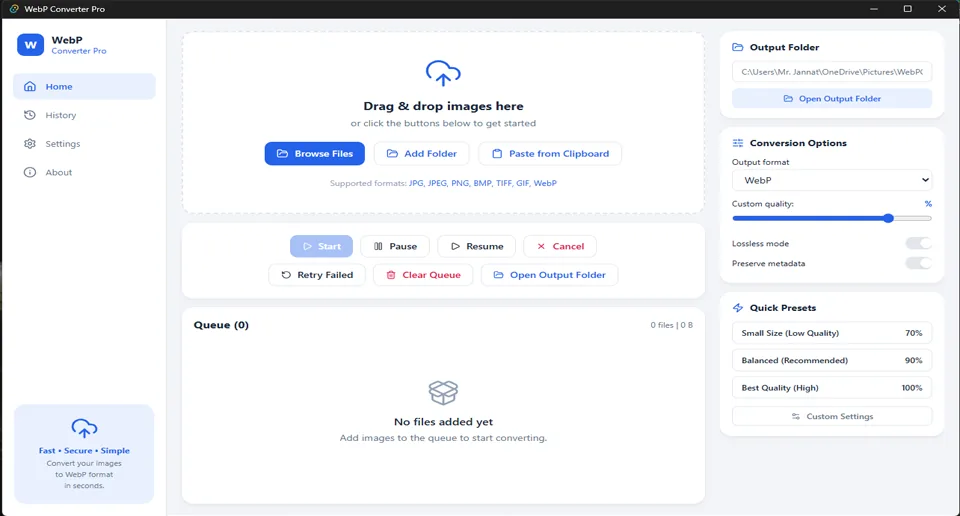
Batch image conversion, entirely on your machine.
Drop in a folder of images, pick your output format and quality, and let the queue run — real OS-level drag-and-drop, live progress per file, and post-conversion savings shown right in the table. No uploads, no accounts, no subscription: everything happens locally, verified by reading the app's own source, which contains zero networking code of any kind.
- Convert to WebP, AVIF, PNG, JPG, BMP, TIFF or GIF
- Real drag-and-drop, folder import (recursively scanned), or browse
- Resize presets — Instagram Square/Portrait, Web Large/Thumbnail, HD 720p, or custom
- Watch Folder — anything dropped in auto-converts with your current settings
- Settings and conversion history persist across restarts
- Full English + Bangla interface
Built for real batch workflows.
Real Drag & Drop
Genuine OS-level drag-and-drop via Tauri's native API — not a browser file-input pretending to be one.
Folder Import
Point it at a whole folder and it recursively scans for every convertible image inside.
Live Queue Table
See status, size, and post-conversion savings % per file as the batch runs.
Resize Presets
Instagram Square/Portrait, Web Large/Thumbnail, HD 720p, or a custom width/height.
Watch Folder
Point it at a folder and anything new dropped in converts automatically, no manual step.
Filename Patterns
Control output names with tokens — {name}, {date}, {index}.
Persistent History
Every past conversion is logged locally and browsable, or clearable in one click.
Settings That Stick
Output folder, quality, and language preferences saved to a local JSON file — no re-configuring every launch.
English & Bangla
Full interface translation, switchable any time in Settings.
Row-Level Actions
Preview, open source or output location, reorder, or remove individual queue items.
Seven output formats, honestly labeled.
Every format below is verified by real unit tests. Nothing is listed as "supported" without a passing test behind it.
WebP
Lossy & lossless mode, the app's primary format. Quality genuinely affects output size.
AVIF OUTPUT ONLY
Typically 20–50% smaller than WebP at equal visual quality. A real CI compile caught and fixed a genuine encoder bug before release — see the changelog below. Reading .avif as a source isn't supported yet.
PNG
Lossless, with correct transparency flattening for formats that don't support alpha.
JPG
Standard lossy output, quality-adjustable.
BMP
Uncompressed bitmap output, for when a workflow specifically needs it.
TIFF
Common in print and archival workflows.
GIF
Basic GIF output support.
Get WebP Converter Pro.
Installers are built automatically by GitHub Actions for all three desktop platforms and published on the Releases page.
Open the Releases page
Click your platform's button above — it opens the v4.1.2 release with every installer listed under Assets.
Download your installer
Windows: .msi or NSIS .exe. macOS: .dmg universal binary. Linux: .deb or .AppImage.
Run it
Standard install flow for your OS. On macOS, see the unsigned-build note below — it's a one-time step.
Read the Privacy Policy — short version: zero network calls, zero data collection.
See it in action.
What's new.
- Full technology migration from the original Python/Tkinter prototype to Tauri + React + TypeScript + Tailwind CSS
- Added AVIF output, resize presets, watch folder, filename patterns, and full settings/history persistence
- Added complete English + Bangla (Bilingual) interface support
- Real GitHub Actions CI now builds genuine Windows
.msiand NSIS.exeinstallers
- A real CI compile reached the AVIF encoder path for the first time and surfaced a genuine API mismatch —
write_image()expectedColorType, notExtendedColorType. Fixed by reading the exact trait signature from the installedimage-0.24.9crate's own source - While fixing that, caught a second issue before it could fail a CI run: the
imagecrate's AVIF feature is encoder-only — decoding needs a separate, unverifieddav1ddependency chain. The test suite originally calledimage::open()to verify AVIF output, which would have failed with no decoder registered - Rewrote those tests to verify success via the AVIF file's real ISOBMFF header signature instead, which needs no decoder — checked against a synthetic real-structure header plus edge cases (empty input, truncated input, a WebP header that shouldn't be mistaken for AVIF)
- All 13 core tests re-confirmed passing after the rewrite; the full
rav1eencoder path still needs one clean end-to-end CI run to close the loop completely
- Drag-and-drop was silently doing nothing — fixed by switching to Tauri's real
onDragDropEventAPI instead of an Electron-only property that doesn't exist in Tauri's webview - Converting before picking an output folder built an invalid path — fixed with a real default folder and a loud failure instead of a silent one
- Changing quality after adding files had no effect — settings were baked in at add-time instead of applied live at conversion time
- .webp files couldn't be converted despite being selectable — the image crate needed its webp decode feature explicitly enabled
- HEIC/HEIF was falsely advertised as supported with no real decode behind it — removed until genuine support exists
- Every conversion failure showed "[object Object]" instead of the real error — a serialization bug, now fixed and test-covered
Frequently asked questions.
Yes — completely free and open source under the MIT License, no ads, no premium tier.
No internet connection is needed. The app makes zero network calls — every conversion happens entirely on your device, verified by reading its own source code. See the Privacy Policy for full details.
Output: WebP, AVIF, PNG, JPG, BMP, TIFF and GIF. Input can also read .webp as a source. HEIC/HEIF isn't supported yet — it was intentionally removed rather than left falsely advertised.
Yes for output — implemented, unit-tested, and recently taken through a real CI compile that caught and fixed a genuine bug (an API mismatch between ColorType and ExtendedColorType) before it could ship. A separate decode-dependency gap was also caught and worked around ahead of time. 13/13 core tests pass; the full encoder path still needs one clean end-to-end CI run to fully close the loop. Reading .avif files as a source isn't supported yet, to avoid a separate unverified decoder dependency chain.
The macOS build isn't code-signed with a paid Apple Developer certificate yet. Right-click the app → Open → Open again — a one-time step per install.
Windows is confirmed via real installers built and tested on GitHub Actions CI. macOS and Linux use the same build pipeline but are still pending their own independently confirmed completed run.
Yes — point Watch Folder at any folder and anything new dropped in converts automatically with your current settings.
Reach out via the contact page, or open an issue on GitHub.
Ready to try WebP Converter Pro?
Free, open source, and 100% offline.