WorkLog OS
Daily work logging made beautifully simple. Track time, manage tasks, run invoices from tracked hours, and see clear reports — all stored locally on your machine, with optional Google Drive backup.
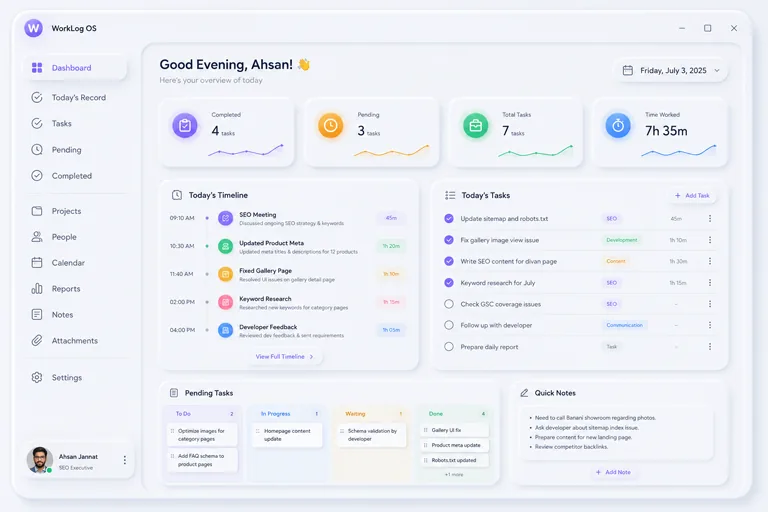
A better way to track your work and grow every day.
WorkLog OS is a desktop app for professionals, freelancers and small teams who want to stay organized without wrestling a bloated project-management tool. Everything runs locally — no account required to get started, no monthly fee, and no lock-in.
- Track time automatically per task, with a built-in timer
- Manage unlimited tasks, projects and clients
- Turn tracked hours into real client invoices (PDF/Word)
- Detailed reports — daily, weekly, monthly, exportable
- Optional Google Drive backup & AI daily summaries
- Works fully offline, always reliable
Everything you need to track your work.
Tasks & Kanban
List or drag-and-drop board view, checklists, attachments and full activity history per task.
Recurring Tasks
Set a task to repeat daily, weekdays, weekly or monthly — it schedules itself automatically.
Time Tracking
Log time per task with a built-in timer, then see exactly where your hours went.
Invoicing
Turn tracked hours into a real client invoice, exported as PDF or Word, in a couple of clicks.
Reports
Daily, weekly and monthly breakdowns — export as PDF, Excel, Word, Markdown or CSV.
Goals
Set weekly or monthly goals and watch progress fill in automatically as you complete tasks.
Calendar
See tasks laid out by due date, and drag any task onto a new day to reschedule it instantly.
Google Drive Backup
Optionally sign in with Google to back up your data to a single file in your own Drive.
Fuzzy Search
Press Ctrl+Shift+A from anywhere, or Ctrl+K inside the app, to jump straight to what you need.
Get WorkLog OS.
Choose your operating system below.
Read the Privacy Policy before signing in with Google.
See it in action.
What's new.
- Added native macOS build (Apple Silicon & Intel universal binary)
- System tray icon reliability fix, Google account linking fix
- Cancel button added for Google sign-in
- Google Sign-In, Google Drive backup, and Log Out
- Tags manager, Recurring tasks, Kanban board
- Clients, Invoicing, Goals, global quick-add hotkey, system tray
- Dashboard, Task Manager, Task Detail, Daily Record
- Projects and Users
Frequently asked questions.
Yes. WorkLog OS is free to download and use, on Windows, macOS, and Linux.
No. You can set up a local profile with just a name and start using the app immediately. Signing in with Google is entirely optional and only needed if you want to back up your data to Google Drive.
All your data — tasks, projects, clients, notes, time logs — is stored locally on your own computer in a SQLite database file. Nothing is uploaded anywhere unless you explicitly connect Google Drive backup. See the Privacy Policy for full details.
Yes, WorkLog OS works fully offline. An internet connection is only needed for optional features: Google Sign-In, Google Drive backup, and AI Daily Summary.
Yes. WorkLog OS ships as a native installer for Windows (.msi/.exe), macOS (.dmg, universal binary for Apple Silicon and Intel), and Linux (.deb and .AppImage).
Reach out directly via the contact page.
Ready to try WorkLog OS?
Free, local-first, and built to actually help you get work done.