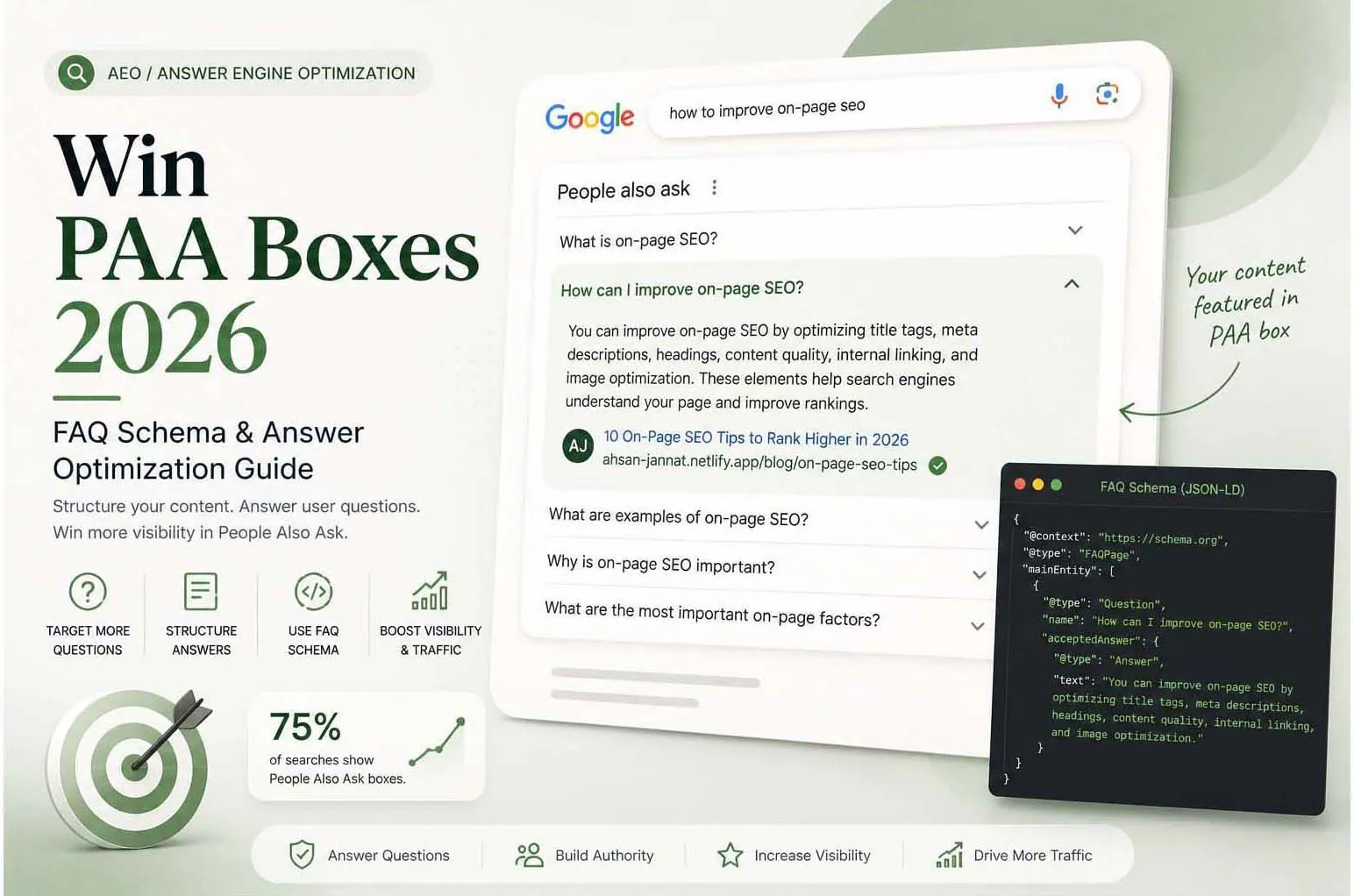
What Are People Also Ask Boxes?
People Also Ask (PAA) boxes are expandable question-and-answer sections that appear within Google search results, typically below the first organic result or featured snippet. When a user clicks to expand a question, Google shows a brief answer pulled from a webpage — and the box expands to show four more related questions.
They're valuable because they provide additional above-the-fold visibility beyond traditional organic rankings — and they appear on the vast majority of searches.
Why PAA Matters for Your Visibility
PAA boxes offer three distinct advantages over standard organic rankings:
- Dual presence — You can appear in both a PAA box and organic results for the same query, effectively doubling your visibility
- Brand trust — Having Google cite your content as the answer to a question establishes instant credibility
- Cascade effect — Expanding a PAA box triggers four more questions, all of which can be from your site
Opportunity: Unlike featured snippets where only one result wins, multiple PAA answers on the same results page can come from the same website. Target a cluster of related questions and you can dominate a topic's entire PAA section.
How Google Selects PAA Answers
Google pulls PAA answers from pages that provide a direct, concise answer to a specific question. The selection factors are similar to featured snippets:
- The answer starts immediately after a heading that mirrors the question
- The answer is between 40–60 words — long enough to be complete, short enough to be scannable
- The answer uses plain, factual language — not promotional or vague
- The source page has relevance and authority for the topic
- FAQPage or Q&A schema is present (not required but strongly helpful)
Match the Answer Format to the Question
Google tends to show answers in the shape that suits the question. If you answer a "how to" question with a long paragraph, or a definition with a table, you make extraction harder. Match the format to the question type:
| Question type | Example | Best answer format |
|---|---|---|
| Definition | What is a canonical tag? | One short paragraph that defines the term in the first sentence |
| Process | How do I submit a sitemap? | A numbered list of steps |
| Comparison | SEO vs SEM: what's the difference? | A short paragraph followed by a small table |
| List of options | What are the types of schema markup? | A bulleted list with a one-line explanation for each item |
| Yes or no | Does HTTPS help rankings? | Start with "Yes" or "No", then one sentence of reasoning |
Content Structure for PAA Success
Research PAA Questions for Your Target Keywords
Search your main keywords and note every PAA question that appears. Also check "People Also Ask" expansions — keep clicking to reveal more. These are your content targets. Tools like AlsoAsked.com visualise the full PAA tree.
Create Dedicated H2/H3 Sections for Each Question
Each target PAA question should have its own heading in your content, written exactly as users ask it. Directly below each heading, write a 40–60 word answer. Then you can expand into more detail.
Add a Standalone FAQ Section
At the bottom of your page or post, add a dedicated FAQ section with 5–8 question-and-answer pairs. Keep each answer tight and factual. This section is the primary target for FAQPage schema markup.
Use Conversational Question Phrasing
Frame headings as natural questions users actually type: "What is...", "How do I...", "Why does...", "When should...". Avoid keyword-stuffed headings — Google wants natural language in 2026.
From Question List to Published Answer
A repeatable process beats ad-hoc edits. For each page you want to improve:
- Collect the questions. Search the page's main keyword and expand the People Also Ask box several times to reveal more questions. Note 15 to 20.
- Group them by theme: definitions, how-to, cost, comparisons and problems.
- Decide where each answer lives. Add it to an existing page if the topic fits, or plan a new page if it needs more than a paragraph.
- Check who answers it today, and in which format, so you can match or improve on it with clearer, more specific information.
- Write the answer first, directly under a question-style heading, then add depth, examples and links below it.
- Log and re-check. Record the date, the question and the page, and look again after a few weeks.
Implementing FAQ Schema
FAQPage schema tells Google explicitly that your page contains question-and-answer content, making it significantly easier for the algorithm to extract PAA answers. Here's a minimal implementation:
Add FAQPage schema as a JSON-LD script in your page's <head>. For WordPress users, plugins like Rank Math and Yoast SEO can generate this automatically from your FAQ blocks.
| Schema Property | Value | Required? |
|---|---|---|
| @type | FAQPage | Yes |
| mainEntity | Array of Question objects | Yes |
| @type (question) | Question | Yes |
| name | The question text | Yes |
| acceptedAnswer | Answer object with @type: Answer | Yes |
| text (answer) | The answer text | Yes |
What FAQ Schema Does and Doesn't Do
FAQ markup is often sold as a shortcut to PAA boxes and expanded search results. The facts are more modest:
- Rich results are limited. Since 2023, Google has shown FAQ rich results mainly for well-known government and health websites, so most sites won't see expandable FAQ listings from markup alone.
- No confirmed link to PAA. Google hasn't said that FAQ markup is required for, or boosts selection into, People Also Ask boxes.
- It still describes your content. Valid markup tells machines which text is a question and which is its answer, as long as it matches what visitors can see on the page.
So use FAQ schema as tidy housekeeping on pages that genuinely contain question-and-answer content, and put your effort into the answers themselves. Never mark up questions that aren't visible on the page.
Real Optimization Examples
Here's the difference between a PAA-unfriendly and PAA-friendly answer format for the question "What is technical SEO?":
PAA-unfriendly: "Technical SEO is a very important part of your overall digital marketing strategy that many businesses overlook, and it involves many different components that work together to help search engines understand your website better..."
PAA-friendly: "Technical SEO is the process of optimising a website's infrastructure so search engines can crawl, index, and understand it efficiently. It covers site speed, structured data, crawlability, mobile optimisation, and Core Web Vitals — the foundation that all other SEO builds on."
How to Track PAA Wins
Search Console doesn't report People Also Ask appearances as a separate feature, so use a mix of methods:
- Manual checks: search your target queries and log which questions show your page in a spreadsheet, with the date.
- Rank trackers: tools such as Semrush and Ahrefs can report SERP features, including PAA, for the keywords you track.
- A Search Console query filter: in the Performance report, add a Query filter set to "Custom (regex)" with a pattern such as
^(what|how|why|when|which|can|does|is|are|should)\sto isolate question-style queries, then watch their impressions and clicks over time.
PAA Mistakes to Avoid
- Answering a different question than the heading asks. If the heading says "How much does X cost?", the first sentence should talk about cost.
- Padding the answer. Long introductions before the real answer make extraction harder and frustrate readers.
- Stuffing in dozens of questions. Cover the ones you can answer well rather than listing every variation.
- Repeating the same answer on several pages. It splits your signals and adds no value.
- Making answers promotional. Save the sales pitch for after the factual answer.
Conclusion
PAA boxes are one of the most accessible SERP features to win — they appear on three-quarters of all searches and can be captured through disciplined content structure and FAQ schema, without requiring high domain authority or extensive link building.
Start by auditing your 10 most important pages. Find the PAA questions that appear for those pages' target keywords. Add dedicated heading-plus-answer sections for each question, implement FAQPage schema, and watch your PAA presence grow within 4–8 weeks.
Frequently Asked Questions
People Also Ask (PAA) boxes are expandable question-and-answer sections in Google search results showing brief answers pulled from webpages, appearing on approximately 75% of all searches.
Structure content with H2/H3 headings matching common questions, write 40-60 word direct answers below each heading, add FAQPage schema markup, and build topical authority in your niche.
No, but it significantly increases the likelihood. FAQ schema helps Google identify and extract structured Q&A content from your page, making it easier to pull into PAA boxes.
PAA placement can happen faster than traditional rankings — typically within 4-8 weeks of implementing proper content structure and FAQ schema on optimized pages.
Yes, as housekeeping, but not for rich results on most sites. Since 2023 Google shows FAQ rich results mainly for well-known government and health sites. Valid markup still describes your content clearly, as long as it matches what visitors can see on the page.
Yes. Several PAA answers on one results page can come from the same site, so a page that answers a cluster of related questions under clear headings can appear more than once.
Search your target queries manually and log which questions show your page. In Search Console, filter queries with a regex that matches question words such as what, how or why, and watch impressions and clicks for those queries over time.
Need Help with SEO, AEO or GEO?
Let's build a visibility strategy that works across Google, AI answers and generative search.
Start a Free Consultation